
Agent Profiles
An agent is the thing that actually does the work: it reads files, runs commands, calls tools, and answers. Every agent in Kiki is defined by a profile — one Markdown file that says which model and thinking effort it runs on, how it is instructed, which tools it may call, and which agents it can hand work to. Write a profile once and every dispatch of that kind of agent reuses it.
This page explains what an agent is, how the main agent and subagents differ, and how to choose and combine profiles. The full field reference lives in Agents and Sub-Agents and Agent profiles: concepts and design.
Main agent & subagents
You talk to one agent per session: the main agent. It receives your messages, plans, calls tools, and produces the replies you see. When a piece of work is worth isolating, the main agent dispatches a subagent to handle it — a coding change that needs exploring first, several implementations to review in parallel, a large refactor to plan without loading the main context.
A subagent is given a task description and works in its own isolated context. It reports back with its conclusions and a note when it finishes; its full reasoning and tool records are not poured into the main agent's conversation, which is what lets several lines of work run at once without the main context filling with detail. That is context isolation, not a sealed box: you can open any subagent to read its own transcript, and message it yourself from its composer — see A subagent keeps its own record.
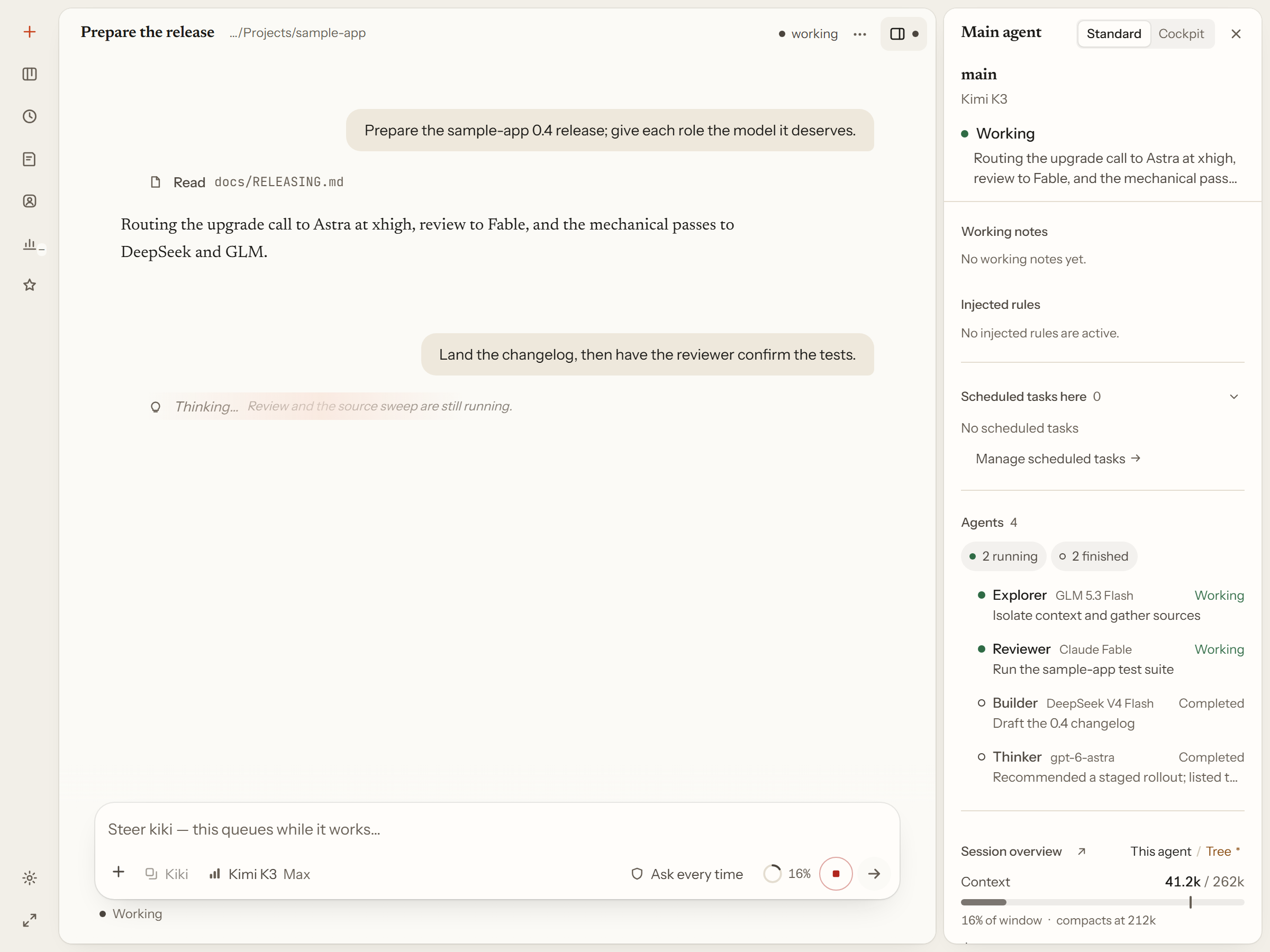
Each subagent spends model tokens of its own, so handing over a task the main agent could finish in one step is pure extra cost. Whether the remaining work is separable enough to hand off is the main agent's own judgment, and naming a role yourself overrides it.
Main agent binding
A profile is not a main agent or a subagent by itself. Which one it is depends on how it is bound:
- Selected as the session's main agent — with
--agentin the terminal, or from the profile selector when you start a session. This is the agent you talk to. - Dispatched as a subagent — when the main agent hands it a task. This is the normal case for every other role.
- Run independently — an external host such as an MCP client, an SDK caller, or an external executor invokes the agent on its own. It is not a subagent of this session, so Kiki gives it the standalone handoff notice instead of the subagent one, but the host is still the side that receives its result.
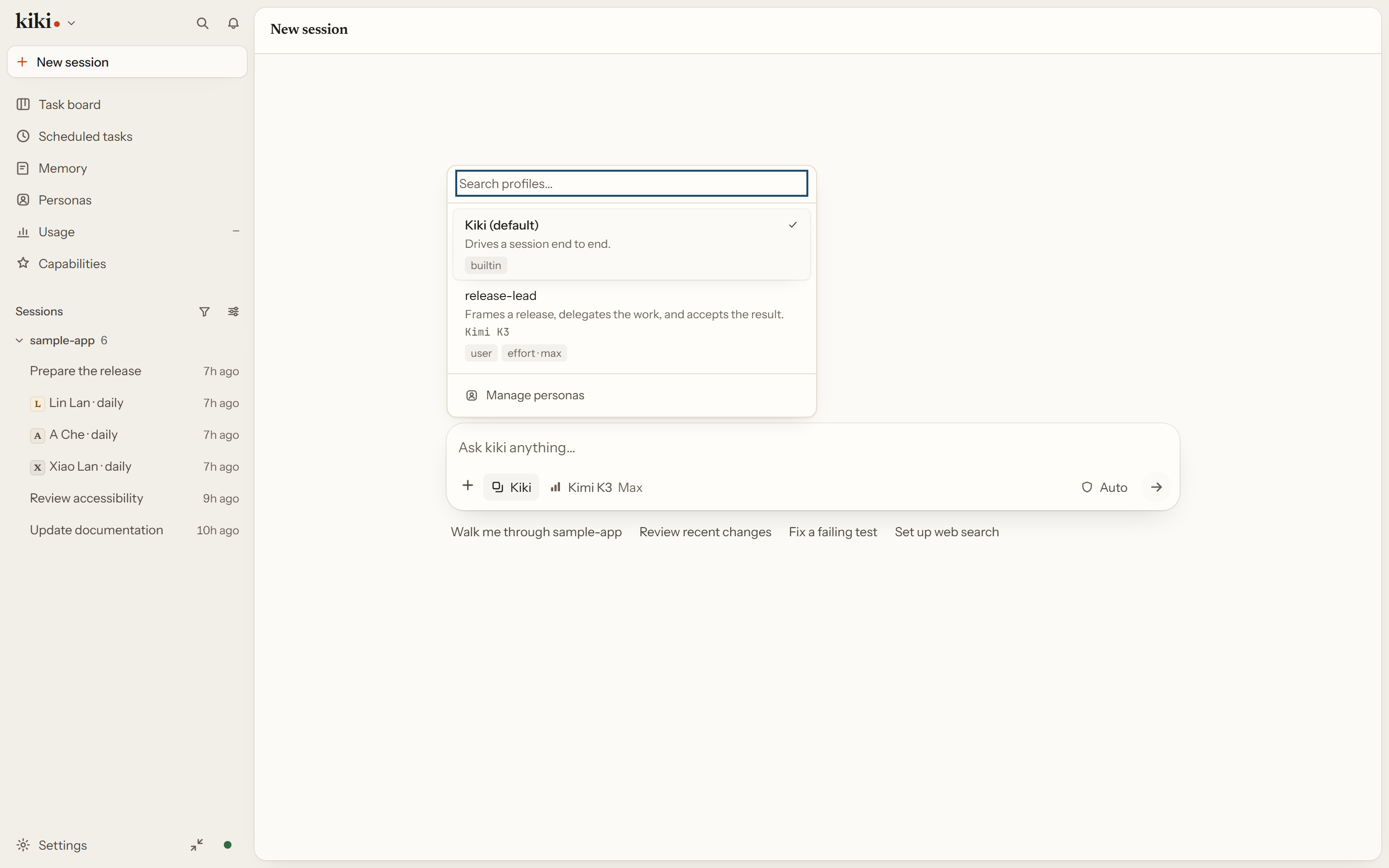
The main: true frontmatter flag marks a profile as a candidate for the session's main agent, which is what puts it in the selector. It is not an authorization gate: naming such a profile explicitly in a dispatch still runs it as a subagent, and it never becomes the session's main agent that way. The actual binding is what you select, and the flag only decides what you can select from.
The session's main agent runs on the model you pick for the session, which overrides whatever its profile pins. A subagent resolves its own model separately, in order: an explicit model_alias on the dispatch, then the pin or model menu of the profile it runs as, then [subagent].default_model. A profile left without a pin and no default configured fails the dispatch with model.not_configured rather than silently inheriting the caller's model — except for the templates that set model_alias: inherit on purpose. So the model you choose in the menu governs the agent you are talking to, and what a profile pins governs every agent dispatched as that role.
Model overrides
When the same model serves both roles, you do not define it twice. A model is defined once — its alias, provider, credentials, context window, and supported efforts — and the roles share the usual operating settings such as default effort, service tier, when the context compresses, and the context budget. The main agent can override just the ones that should differ, and anything it leaves unset is inherited; a subagent simply uses the shared values.
So a single model can be set to a high effort for the agent you talk to and the default elsewhere, or compress at a tighter point for the main agent while subagents keep the shared trigger. Everything not named stays shared, and an explicitly chosen model or effort in a session still wins. Prompt fields follow the same split between shared, main, and independent: parameters are inherited field by field, while the old prompt identity blocks still replace as a whole. See models in the config reference and Model menus and hard boundaries for the exact rules.
One file per role
The frontmatter carries the configuration — the name, the description the dispatcher reads, the model and thinking effort, the tool allowlist, and which subagents the role may itself dispatch. The body is the system prompt the agent starts from. Nothing else is required: a profile is plain text you can read, diff, and keep in version control.
Fresh installs ship three roles you can use immediately: the main agent that drives sessions, general, a general-purpose subagent that can read, write, run commands, and search, and explore, a read-only explorer for mapping unfamiliar code.
Settings → Agents is where they all live. One list, main agents and subagents side by side, each row showing its model, effort, and which child agents it may create — with the file each one comes from when you need to edit it.
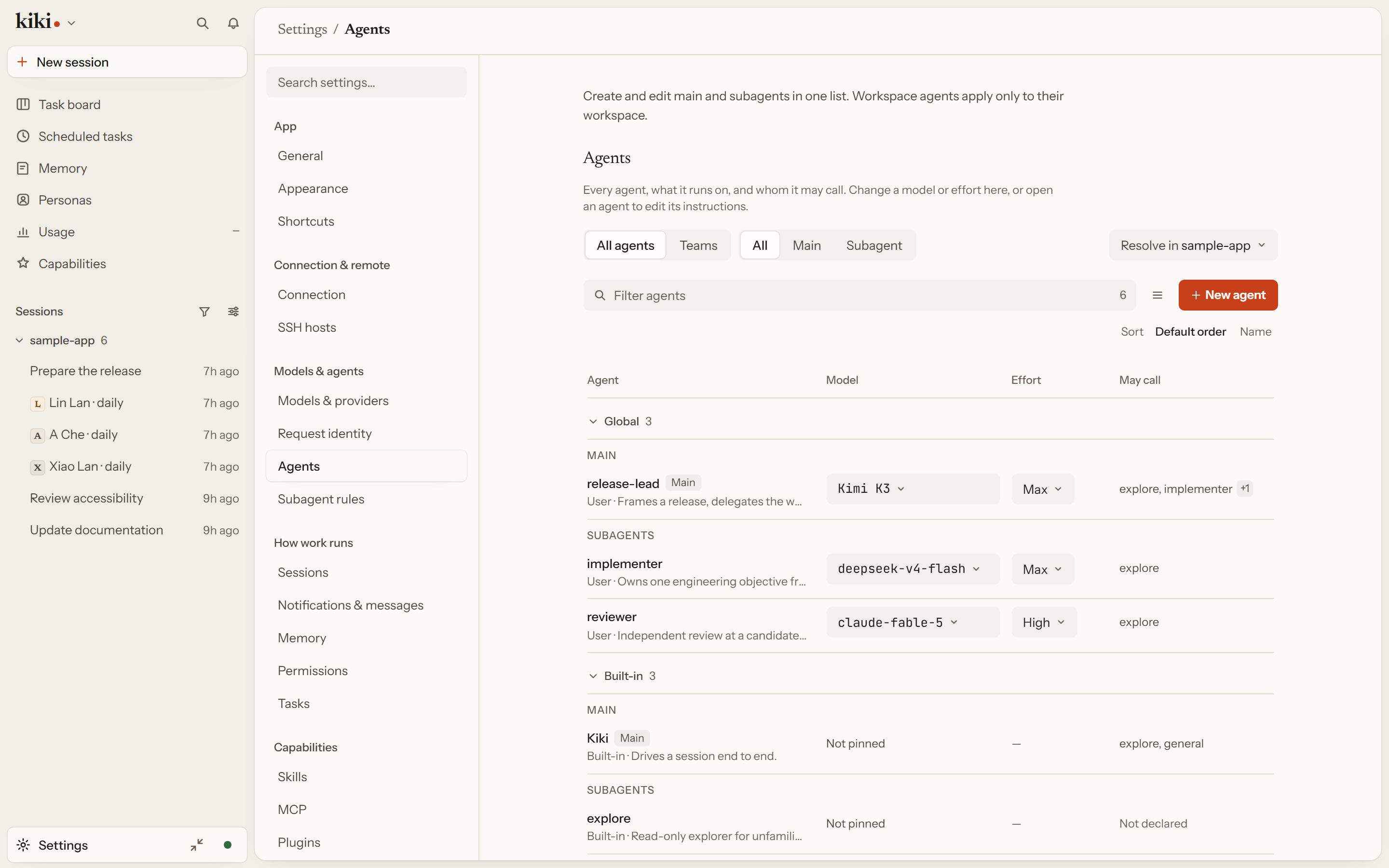
Shipped & custom roles
Two more ship as templates, because most work divides into the same two shapes:
implementerowns one technical objective end to end — investigate, implement when authorized, verify, and hand off with evidence. It may useexplorefor read-only groundwork but keeps the final engineering judgment.reviewerjudges a decision, a candidate, or a repair independently and read-only, reporting findings without changing the work. Its tools are restricted so it cannot edit or dispatch.
Both templates set model_alias: inherit, so the role follows whatever model dispatched it unless you pin one. You can add them from first-run setup, the /kiki-profile skill, or Settings → Agents.
Editing one opens its own page. The form covers the fields that matter — the instructions it starts from, the description the dispatcher reads, when to use it, model, effort, engine, whether it can drive a session, and which child agents it may create — with a Raw file tab beside it when you would rather read or write the Markdown directly.
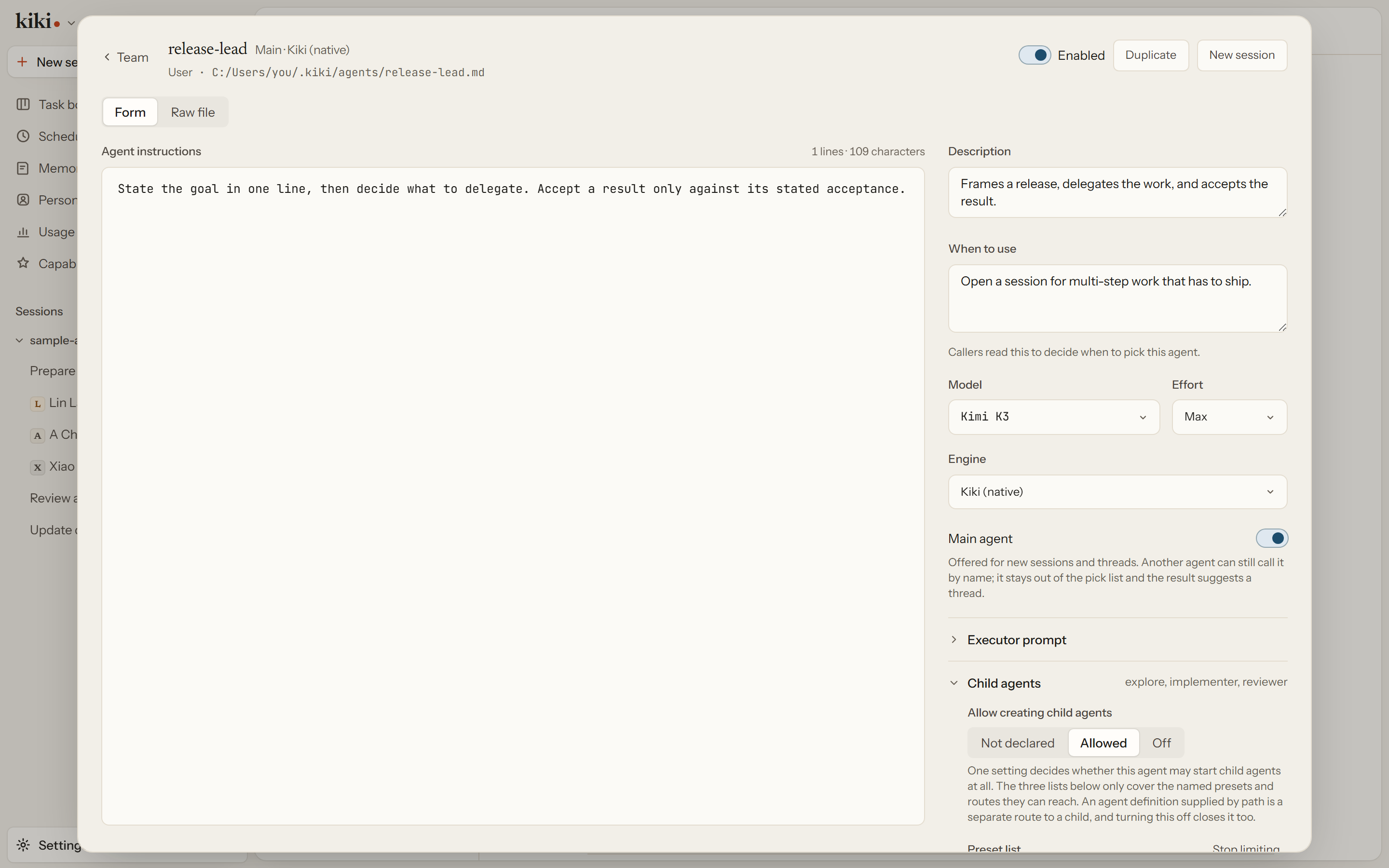
Writing your own pays off when a kind of work recurs and has house rules: a reviewer that must cite file and line, a tester that always runs the suite before reporting, an implementer that must not touch generated files. Starting from a copy of a role that already works, or from a shipped template, beats starting blank.
Dispatch & model rules
You rarely pick a profile by hand. The main agent dispatches on the description and whenToUse each profile declares, so those two lines decide the work — write them for the dispatcher, not for yourself. You can still steer: ask for a role by name ("use explore to map the files first"). Whether a dispatch stops for your approval depends on the session's permission mode — under manual each one is a request you read and accept or reject, while auto and yolo let routine dispatches proceed.
Where a role runs is also yours to fix. Bind the main agent, each subagent, and the reviewer to different models or vendors so a strong model plans while cheaper ones do routine work. Set a hard allowlist when a role must not run an expensive model, and a model menu with restrict_models_to_menu: true when the profile already maintains a complete permitted set. See Providers and models and Model menus and hard boundaries.
Edits reload in about 200 ms and newly dispatched agents pick them up immediately. A session already in flight keeps the profile snapshot it started with, so use Rebuild context in that session to apply the change without losing the conversation. See Profile reloads and live sessions.
A profile is not a persona
A profile is execution configuration: tools, permissions, model, effort, and the prompt the role starts from. A persona is identity: who someone is, what they are for, and what they remember across conversations. A persona card names the profile it rides on, and you can rebind that profile without losing the identity.
Next steps
- Agents and Sub-Agents — the field reference and dispatch contract
- Agent profiles: concepts and design — where profiles live and when changes take effect
- Subagents & Multi-Model — what the main session does with a dispatched tree
- Models, Prompts & Permissions — prompt overrides, connections, permission modes, and hooks