
Plugins, Skills, MCP & Search
Beyond the model, the prompt, and the tools an agent already has, Kiki has four extension seams: plugins that bundle capabilities, skills that add reusable workflows, MCP servers that connect external tools, and search and retrieval for what it knows about the web. This page covers each of the four and how they differ — because a plugin, a skill, and an MCP server sound alike and are not.
Official & curated plugins
A plugin is the packaging unit. One plugin can contribute skills, agents, MCP servers, hooks, commands, tools, and sandboxed panels, and you can browse, install, and configure plugins under Capabilities → Extensions & tools. Claude Code plugins with a .claude-plugin/plugin.json manifest install too, and you can point Kiki at your own marketplace JSON.
The catalog is the Official tab: Kiki's own plugins and upstream entries maintained by Kimi, installed one at a time as a task needs them.
- Kiki Extract turns a local PDF, Office, HTML, or text file into Markdown that
ReadandGrepcan use. It is a reading step: the original is neither created nor edited, and PDF or Office input needs Python with MarkItDown on the machine running Kiki. - Kiki Office Suite creates and edits local Word, Excel, and PowerPoint files.
- Kiki Work audits CSV/TSV keys and reconciles two tables locally, without changing or uploading either.
- Kiki Writing adds a focused manuscript panel with a draft command.
- Kiki Notion connects Notion's hosted MCP service and writes back only to the page you name.
- Task board (
kiki-task-board) keeps requirement cards for a workspace, each linked to the sessions working on it. - Cloudflare Tunnel and Kiki Sites expose a local service or deploy a site.
- Kimi Datasource answers natural-language questions about market data, macro indicators, company records, academic literature, and Chinese law; it needs a Kimi Code OAuth sign-in, and queries spend plan quota.
- Kimi Browser Extension drives the browser you already use, with the matching extension installed from the store and approved there.
Browser and computer control are dedicated system capabilities: besides the Kimi extension, Kiki can run an independent browser, attach to an existing browser over CDP, connect Ego Lite, or drive desktop apps through the built-in executor or Kimi Computer Use plugin. See Browser & Computer Control and Settings pages: Browser control.
Each plugin is installed, configured, and enabled on its own. Installing one never runs its hooks by itself — they fire only when their matching event occurs while the plugin is enabled. See Plugins.
Media generation uses a media plugin's sources for images, video, or speech, configured under Capabilities → Extensions & tools → Plugins → Media sources. There is no extra experimental switch: install and enable the plugin, configure and enable a source, then request generation when you need it. Saving or listing sources does not start a job. See Media sources for source access and authorization.
Agent Skills
An Agent Skill is a Markdown file that injects a specialized workflow or body of knowledge the agent invokes when it is relevant, and it registers as a slash command you can trigger yourself with /name. If you name several in one prompt after whitespace, Kiki activates them together and runs them as a single turn. A skill can also be invoked explicitly as /skill:<name>, and its resources (scripts, references) live beside its file.
A custom prompt command is the lightweight sibling: just a prompt snippet you trigger with /name, with no agent involvement. See Agent Skills and Custom prompt commands.
MCP servers
Model Context Protocol servers let the agent call tools exposed by external processes or services — a database, a GitHub tracker, a local filesystem. Kiki connects as an MCP client over three transports: stdio (Kiki starts the server as a child process), HTTP (an already-running endpoint), and SSE (a legacy streaming transport; prefer HTTP for new servers). Configure them in mcp.json at the user level (~/.kiki/mcp.json) or the project level (.kiki/mcp.json), and manage them interactively with /kiki-ops help me configure MCP or inspect status with /mcp. A project-level server in an untrusted folder shows its transport and launch target in the trust prompt — read it before you trust the folder.
MCP tools reach the agent exactly like built-in tools, with the same approval model. See Model Context Protocol.
Search & retrieval
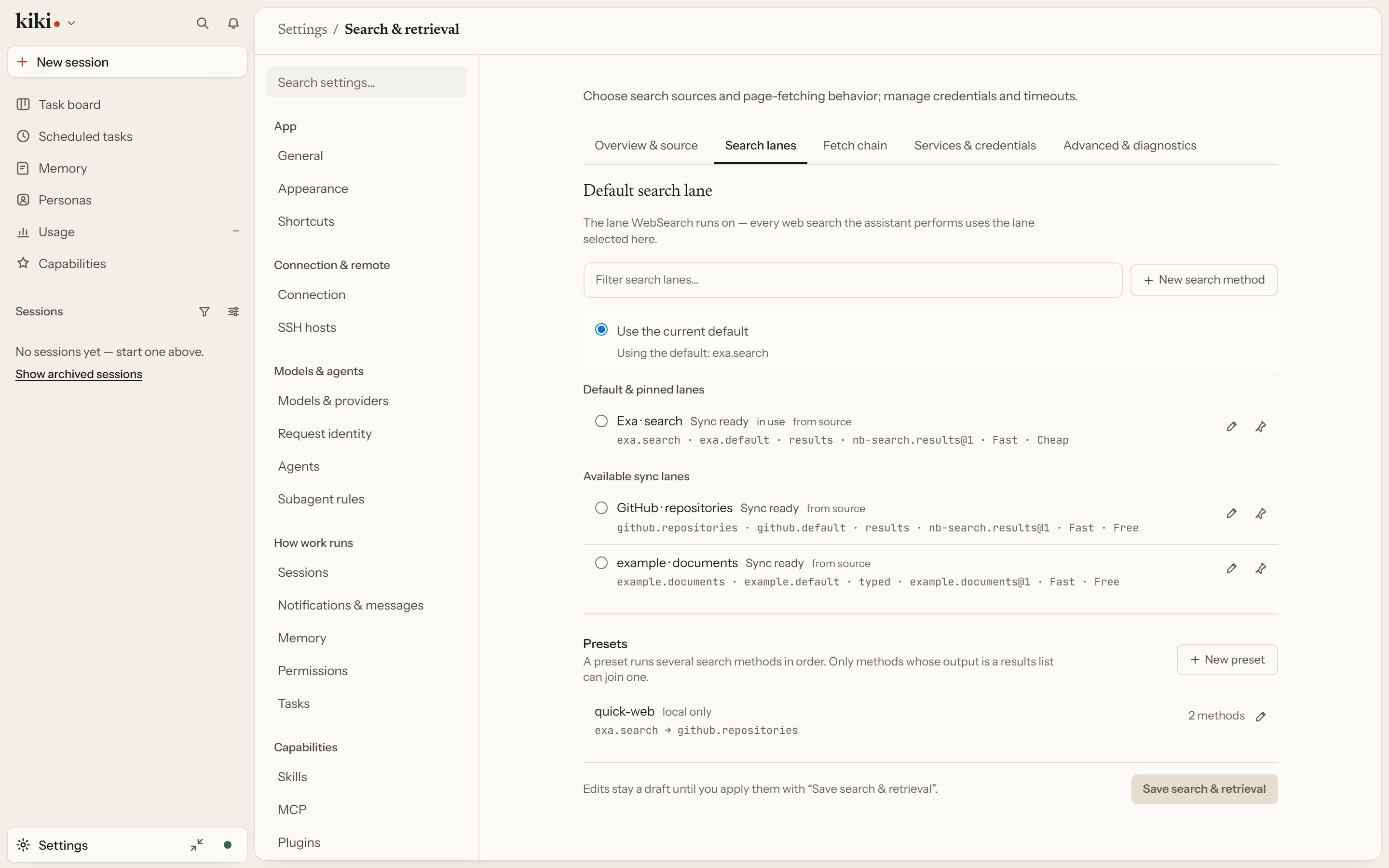
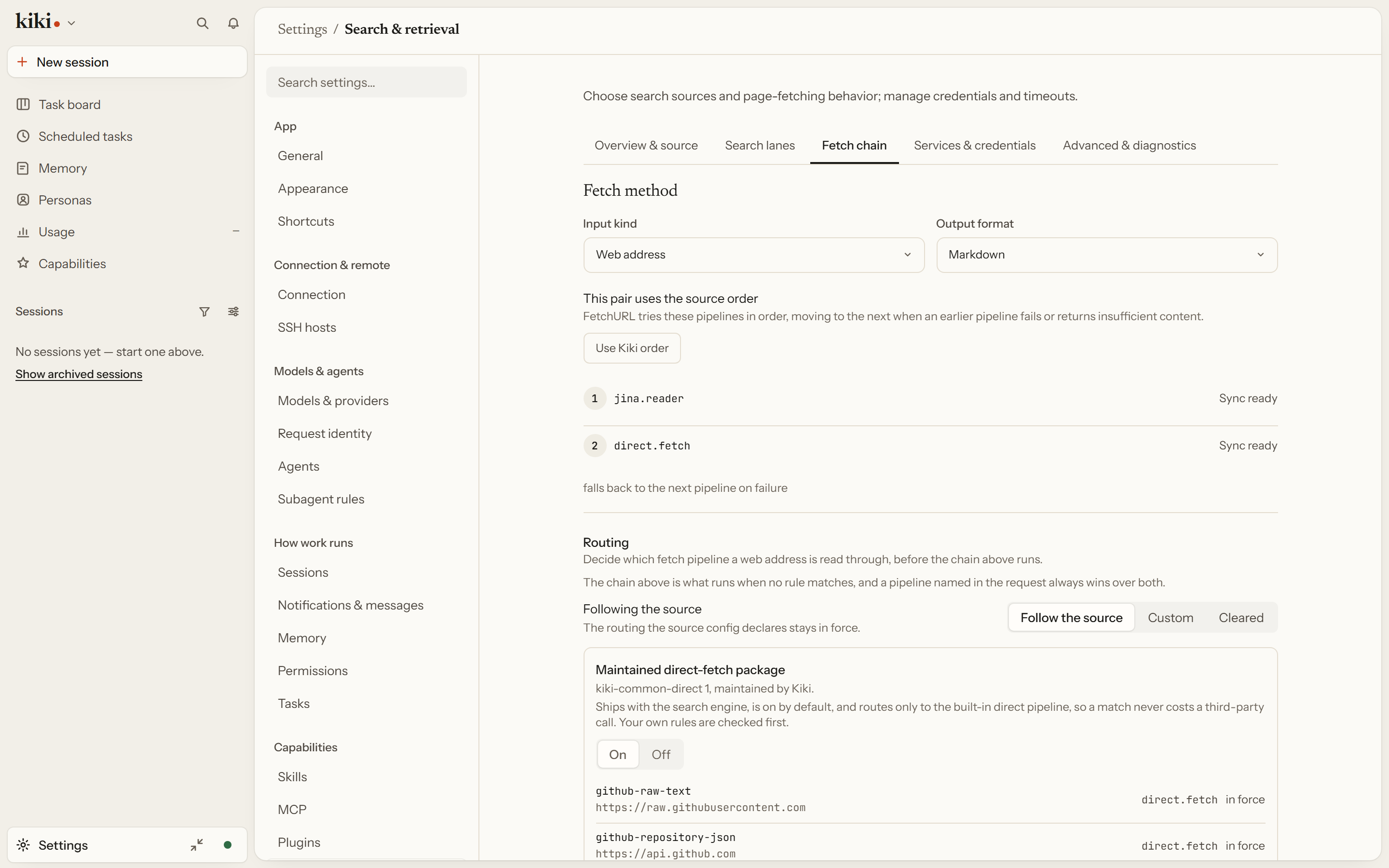
Use WebSearch to find web pages and FetchURL to read their contents — both backed by an inspectable search and retrieval module. Settings → Search & retrieval → Overview & source shows which configuration source is in effect and whether the server reuses your local search configuration; /mcp-style status and the readiness of each named lane are visible there too. Search runs on named lanes you can inspect — some, like GitHub repository search, work without a key, and multiple keys for one provider rotate across calls. A fetch runs a chain with visible fallbacks, so you can see which extractor produced the text. The equivalent configuration lives in config.toml under nb_search. See Search and retrieval and Config files: nb_search.
Next steps
- Plugins — the full plugin reference
- Agent Skills — writing a skill
- Model Context Protocol — connecting MCP servers
- Browser & Computer Control — driving browsers and desktop GUI apps