
History Import, IDEs & Engines
Kiki meets other tools in more than one direction, and the directions are not the same promise. This page keeps them apart, because the honest way to describe each one is different:
- Bringing your history in — Kiki reads conversations another tool already produced and turns them into sessions you can keep working in. That is reading, not interop.
- Letting other tools use Kiki — Kiki runs as a service an external tool calls: an IDE drives your sessions over ACP, and a tool like Cursor, Claude Code, or Codex calls it over a fixed seat.
- Letting Kiki use other tools as engines — another agent harness runs one of your subagents, and can in turn call Kiki's own context back.
History import
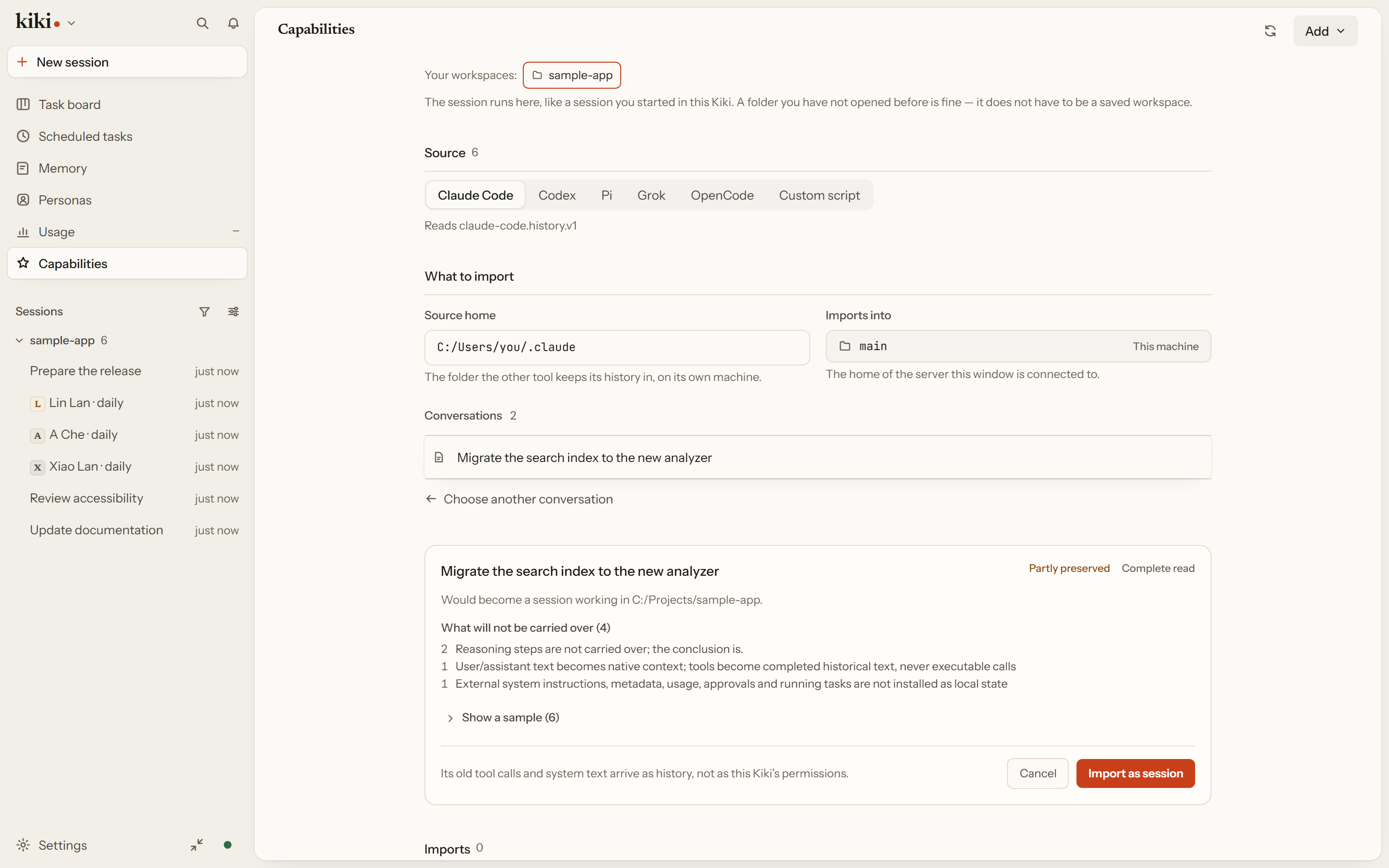
Kiki's built-in history import turns another tool's text conversation into a Kiki session you can keep working in, or saves it as a read-only archive. Claude Code, Codex, Pi, Grok Build, and OpenCode export files, plus a custom JSON or script, need no plugin, no trust, and no activation. Import runs on the Kiki server without a model, and leaves the source files where they were.
Open New session and choose Import history, or go through Settings → Sessions → Import history. Then: choose what the conversation becomes (Kiki session is the default — the conversation becomes a session here, with its earlier turns as context, and you carry on where the other tool left off; Read-only archive keeps it as a record you can read but not continue); choose the working directory; pick a format; choose the Source home — the folder the other tool keeps its history in; pick a conversation; and read the preview. The preview says whether the source could read the conversation at all (Complete read or Sample), what would be kept, what would not be carried over, and where the result lands. That preview is the one confirmation the conversation gets.
It is worth reading what does not come over. User and assistant text becomes the session's earlier turns. A tool call from the old conversation arrives as text saying it already happened — it is never re-run, and it grants no permission here. The other tool's system instructions, metadata, usage counts, approvals, and running tasks are not installed as this Kiki's own state, and the preview lists each as a loss. Attachments are not copied; they leave a placeholder and a counted loss entry.
History import is on by default, but it does not scan folders or import anything at startup. See Session history import.
IDEs & MCP seats
This is Kiki as a service, and it comes in two shapes.
An editor drives your Kiki sessions (ACP). kiki acp switches Kiki into Agent Client Protocol mode, speaking JSON-RPC over stdin/stdout so an IDE can drive its sessions, prompts, and tool calls directly. Zed, JetBrains AI Chat, and Paseo all support this. The method coverage is broad: a normal agent flow (initialize → auth → new/load/resume → prompt → cancel, with file I/O and tool approval) is implemented. A few capabilities are worth knowing: file reads and writes are executed by the client, so Kiki requests the contents through the IDE rather than reading your machine directly; and if your IDE's stdio MCP servers need to run inside Kiki's process, you opt in explicitly with kiki acp --allow-client-stdio-mcp. HTTP and SSE MCP forwarding work without that option.
An external tool calls Kiki (a seat). kiki seat fixes a seat for inbound MCP clients — the workspace, principal, permission mode, model, and thinking effort are settled before the external tool connects, and the caller cannot change them afterwards. kiki seat install writes the stdio MCP configuration for Cursor, Claude Code, Codex, or a generic client into that client's own config. kiki mcp runs the stdio edge directly.
See Using Kiki in IDEs, kiki acp, and kiki seat.
External engines
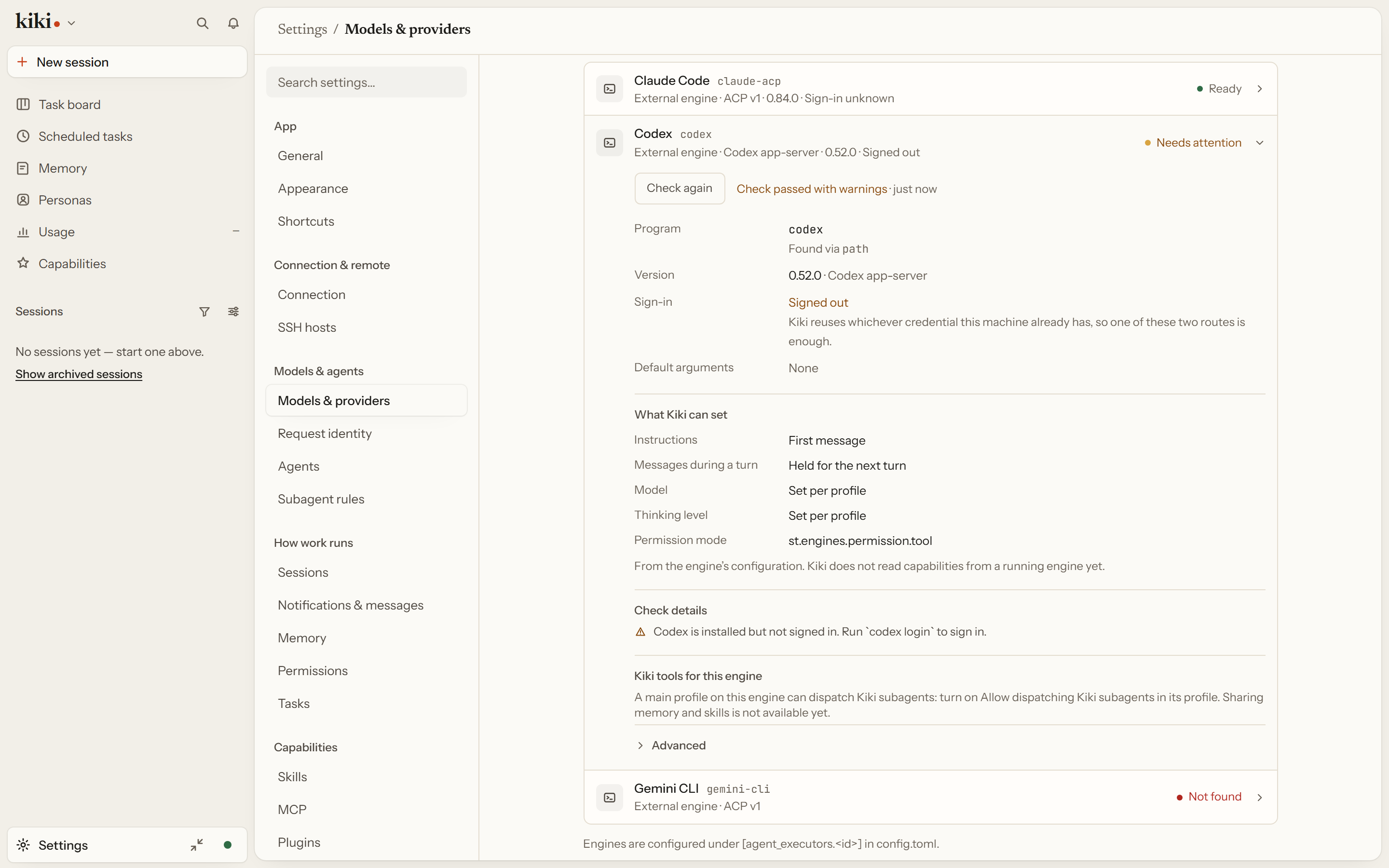
The direction reverses: another agent harness runs your subagent. An agent profile can carry an executor and run on Claude Code, Codex, Cursor, Gemini CLI, Kimi CLI, OpenCode, or Grok Build over ACP or the Codex app-server. Settings → Models & providers → Providers & accounts → External engines checks whether each one is installed and shows the setup steps that remain.
In an external-engine conversation, the composer's model picker lists the models that engine reported, not Kiki's native model aliases. You can still enter an engine model ID directly. A saved ID stays selected when the engine no longer lists it; the picker marks it not in this engine's list instead of silently replacing it. The model an engine reports actually using does not overwrite your selection.
The picker carries one status line for the catalog read: empty when it is current, Last read over a minute ago. when the observation is stale, or the failure when the last refresh failed. Refresh asks the engine again without sending the draft. Unknown does not mean unsupported: capability answers live at the controls they govern. An engine that declares in-place model switching unsupported says so at the picker, with its own detail, and the context meter offers manual compaction only when the engine declares it — otherwise the meter says whether the engine declined or has not answered.
A seat is a fixed place external tools call into; an external executor is a place Kiki dispatches out to. When the external harness is the main agent instead, allow_kiki_subagents: true lets it dispatch Kiki subagents back, and kiki_context can expose Kiki's own native context — memory, board, cron, threads, history, hooks — to it over the same bridge, with child completions queued back to the main agent. The profile's tool policy, dispatch policy, model constraints, and notification policy still apply across that bridge.
See External main-agent delegation and Kiki context in external main agents.
Next steps
- Session history import — bringing another tool's history in
- Using Kiki in IDEs and
kiki acp— Kiki in an editor kiki seat— external tools calling Kiki